


How to Check Website Traffic: A Complete Guide to Analysing Any Website (2026)
Website traffic is one of the important indicators of a website’s online presence. Whether you operate a business, manage a blog, work in digital marketing, or plan to launch a new website, understanding how to check website traffic can help you make informed decisions.
Website traffic analysis provides insights into how many visits a website receives, where its visitors come from, which search terms bring people to it, and which geographical regions contribute to its audience.
However, checking the traffic of your own website and analysing someone else’s website are two different processes. While website owners can access their private analytics data, third-party tools provide estimates for analysing other domains.
This guide explains how to check website traffic, which metrics matter, and how to use free website traffic checker tools for competitor research.
What Does Website Traffic Mean?
Website traffic refers to the visits a website receives from people accessing its pages through different channels.
Visitors may discover a website through Google searches, social media platforms, referral links, advertisements, email campaigns, or by directly entering its address into a browser.
Traffic is commonly measured using metrics such as sessions, users, page views, and visits.
Understanding these metrics is important because they represent different aspects of website activity.
For example:
- Visits: The number of times people access a website during a reporting period.
- Users: The estimated or measured number of distinct visitors.
- Page views: The number of pages viewed by visitors.
- Traffic sources: The channels through which visitors reach a website.
- Engagement: How visitors interact with website content.
These measurements help website owners understand audience behaviour and evaluate their digital presence.
How to Check Website Traffic for Any Domain
There are several ways to check website traffic, depending on whether you own the website or want to research another domain.
If you own the website, you can use analytics platforms connected to it. If you want to check a competitor’s website, you can use third-party traffic estimation tools.
1. Use a Free Website Traffic Checker
A free website traffic checker is one of the simplest ways to explore another website’s estimated traffic.
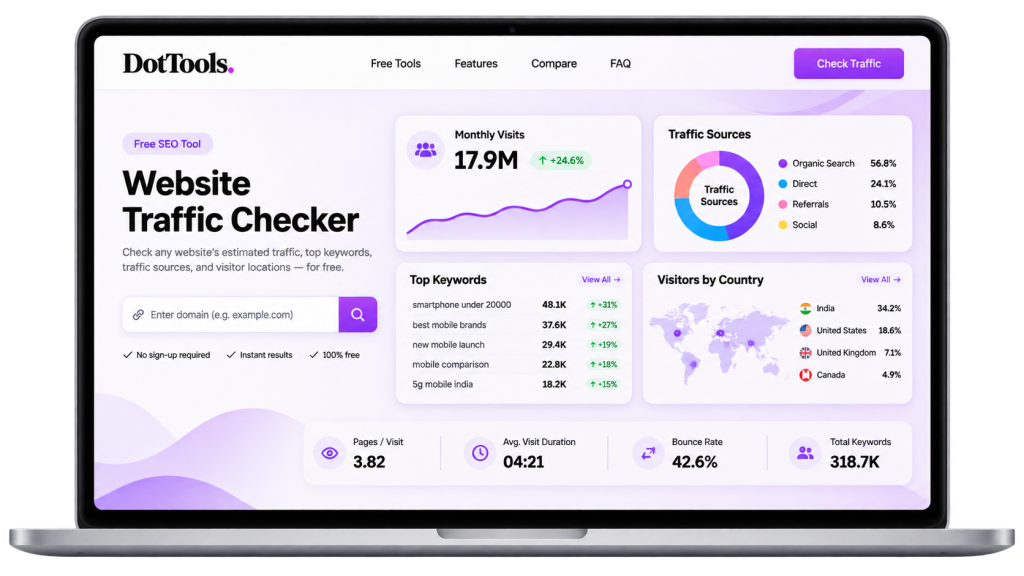
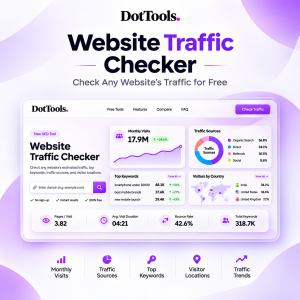
For example, DotTools provides an online website traffic analysis tool that allows users to enter a domain and examine available traffic information.
You can use the Free Website Traffic Checker to analyse websites without creating an account.
The general process is straightforward:
- Open the DotTools Website Traffic Checker.
- Enter the domain name you want to investigate.
- Submit the domain for analysis.
- Review the available estimated traffic information.
- Examine the traffic sources, keywords, and visitor locations where available.
This approach is useful when you want a quick overview of a website without setting up an analytics account.
2. Use Google Analytics for Your Own Website
Google Analytics is a widely used platform for measuring website activity.
Website owners can integrate Google Analytics with their websites to collect information about visitors, sessions, page views, acquisition channels, and engagement.
Unlike third-party traffic estimation tools, Google Analytics can provide first-party measurement data from the website where it has been properly installed and configured.
It is particularly useful for understanding how visitors interact with your own website.
However, you cannot use your Google Analytics account to access the private traffic reports of another company’s website.
3. Use Google Search Console to Analyse Search Traffic
Google Search Console helps website owners understand how their pages perform in Google Search.
It provides information about:
- Search impressions.
- Search clicks.
- Click-through rates.
- Average search positions.
- Queries that display your website.
- Pages receiving search visibility.
Search Console is especially useful for understanding organic search performance.
For example, if a website receives many impressions but relatively few clicks, improving its page titles and descriptions may help increase its click-through rate.
However, Search Console does not provide complete traffic information from every source.
4. Use SEO Research Platforms
Several SEO platforms provide website research and competitive analysis features.
Tools such as Semrush, Similarweb, and Ahrefs offer different approaches to analysing website performance.
Depending on the platform and subscription, their features may include estimated visits, organic search traffic, keyword rankings, referring domains, and competitor comparisons.
These platforms can be useful for businesses and marketing professionals who require more detailed research.
How to Check a Competitor’s Website Traffic
Competitor traffic research can help businesses understand how other websites attract visitors.
Before launching a product, starting a blog, or entering a new market, examining competing websites can provide useful information about their online visibility.
Start by identifying three to five competitors operating in the same industry.
Then compare their available traffic information using the same tool.
For example, create a simple comparison table:
| Metric | Competitor A | Competitor B | Competitor C |
|---|---|---|---|
| Estimated monthly visits | Check | Check | Check |
| Main traffic source | Check | Check | Check |
| Top keywords | Check | Check | Check |
| Leading visitor country | Check | Check | Check |
| Traffic trend | Check | Check | Check |
This comparison can reveal differences in audience size, search visibility, and traffic acquisition channels.
A competitor receiving significant organic search traffic may have invested heavily in SEO, while another website may depend more on social media or referral sources.
Remember that estimated traffic does not reveal a competitor’s revenue, customer numbers, or conversion rate.
Important Website Traffic Metrics You Should Understand
Simply knowing how many visits a website receives is not enough. You should also understand the different metrics that contribute to website performance.
Monthly Website Visits
Monthly visits indicate the estimated or measured number of visits a website receives over a month.
This metric is useful for comparing websites and understanding broad differences in online audience activity.
However, visits should not be confused with unique visitors.
Traffic Sources
Traffic sources explain how people discover a website.
The main traffic categories include:
Organic search: Visitors arriving through unpaid search engine results.
Direct traffic: Visitors accessing a website directly or through sources where the referring information is unavailable.
Social traffic: Visitors arriving through social media platforms.
Referral traffic: Visitors following links from other websites.
Paid traffic: Visitors arriving through paid advertising campaigns.
Understanding these channels can help businesses identify where their online visibility comes from.
Top Search Keywords
Search keywords are the terms people use when looking for information, products, or services.
Analysing the keywords associated with a website can reveal the topics that contribute to its search visibility.
For example, a technology website might attract visitors through searches related to cybersecurity, software reviews, hosting services, or technology news.
This information can help content creators identify relevant subjects for future articles.
Visitor Locations
Geographical information helps businesses understand where their online audiences are located.
A website serving customers in India may have a different audience distribution from a website targeting the United States or Europe.
Understanding visitor locations can help businesses plan regional content, marketing campaigns, and product availability.
How to Increase Website Traffic After Analysing It
Checking website traffic is only the first step. The next step is using the information to improve your own website.
Here are several approaches worth considering.
Publish Useful and Relevant Content
Create content that answers questions people are actively searching for.
Research relevant keywords, understand the audience’s requirements, and publish informative articles that provide practical value.
Avoid producing multiple pages with nearly identical content simply to target different keyword variations.
Improve Search Engine Optimisation
SEO helps search engines understand your website and its content.
Focus on descriptive page titles, useful headings, internal links, mobile responsiveness, website performance, and relevant content.
You should also ensure that important pages are accessible to search engines and included in your sitemap.
Build Relevant Backlinks
Backlinks are links from other websites pointing to your pages.
Relevant links from established publications, industry websites, and useful resources can help improve your website’s authority and search visibility.
Prioritise genuine editorial links rather than purchasing large quantities of unrelated backlinks.
Understand Your Traffic Sources
Do not depend entirely on one acquisition channel.
Explore opportunities across organic search, social media, newsletters, referral partnerships, and other channels relevant to your audience.
Use your analytics data to understand which channels are bringing valuable visitors.
Monitor Performance Regularly
Check your website’s performance at regular intervals.
Compare results over several months instead of making decisions based on a single traffic report.
This makes it easier to identify meaningful changes and evaluate the results of your marketing activities.
Website Traffic Checker vs Website Analytics
Although these tools are related, they serve different purposes.
| Feature | Traffic Checker | Website Analytics |
|---|---|---|
| Analyse other domains | Yes, using estimates | Generally no |
| Measure your own website | Depends on the tool | Yes |
| Monthly visit estimates | Often available | Actual measured data when configured |
| Audience acquisition | Estimated | Measured |
| Visitor behaviour | Limited or estimated | Detailed reporting |
| Competitor research | Useful | Not designed for private competitor data |
A traffic checker is generally more suitable for preliminary competitor research, while an analytics platform is better for measuring the actual activity of a website you control.
Using both approaches can provide a more complete understanding of online performance.
Common Mistakes When Checking Website Traffic
Website traffic analysis can be misleading if the available information is interpreted incorrectly.
Some common mistakes include:
Treating estimates as exact numbers: Third-party traffic tools use different datasets and estimation methods. Their results may differ significantly.
Comparing different tools: Traffic estimates from separate platforms may not be directly comparable. Use the same tool when comparing multiple domains.
Ignoring traffic sources: Two websites with similar monthly visits may have completely different acquisition strategies.
Confusing traffic with revenue: High traffic does not automatically mean high sales or profitability.
Ignoring long-term trends: A temporary increase in visits does not necessarily indicate sustainable growth.
Understanding these limitations helps you make better decisions using traffic analysis.
Frequently Asked Questions
1. How do I check website traffic?
You can check website traffic using online traffic analysis tools, analytics platforms, or search performance tools. For competitor research, a third-party website traffic checker can provide estimated traffic information.
2. Is there a free website traffic checker?
Yes. DotTools offers a free online website traffic checker that allows users to analyse domains and explore available traffic information without registering an account.
3. Can I check website traffic without owning the website?
Yes. Third-party traffic estimation platforms allow you to research other publicly accessible domains without having access to their private analytics accounts.
4. How can I check how many visitors a website gets?
You can enter the website’s domain into a traffic estimation tool to examine its estimated visits. If you own the website, analytics platforms can provide more direct measurements.
5. Can I check website traffic by country?
Some website traffic analysis platforms provide estimated geographical information, including the countries contributing to a website’s audience.
6. What is the difference between website visits and page views?
A visit generally represents a browsing session, while a page view represents an individual page being viewed. One visit can include multiple page views.
7. Can website traffic checkers show competitor keywords?
Some traffic checker and SEO research platforms provide keyword information associated with competing websites. The available data depends on the platform.
8. Which is better for website traffic analysis, Semrush or Similarweb?
Both platforms offer website research features, but their methodologies, available metrics, and subscription plans differ. The better choice depends on whether you need SEO research, broader audience intelligence, or competitive analysis.
Final Thoughts
Knowing how to check website traffic is useful for anyone working with websites, digital marketing, or online businesses.
A combination of traffic estimation tools, website analytics, and search performance data can help you understand online visibility, research competitors, and identify opportunities for growth.
If you want to start analysing websites without a complicated setup, try the DotTools Free Website Traffic Checker.
Enter a domain, explore the available traffic insights, and use the information to make more informed decisions about your website and digital strategy.
Start here: https://tools.dottimes.in/website-traffic-checker/